

Manual data entry may seem like a normal part of running a business, but repetitive data handling can become a major source of operational problems. Employees enter customer information, sales records, invoices, inventory details, reports, and internal data across multiple systems every day.
Even a small mistake can create larger problems. An incorrect phone number can disrupt customer communication, a wrong invoice amount can cause billing issues, and outdated inventory data can lead to poor purchasing decisions. With the right custom software development and business automation, repetitive data tasks can be controlled more efficiently without replacing every existing system.
Why Manual Data Entry Causes Business Problems
Manual processes depend on employees entering information correctly and consistently. As the amount of data increases, maintaining accuracy becomes more difficult. Common problems include:
- Incorrect customer information and duplicate records
- Missing data and incorrect invoice details
- Delayed updates between departments
- Repeated data entry and spreadsheet errors
- Outdated reports and time lost to administrative work
When departments maintain separate databases or spreadsheets, information can quickly become inconsistent. A sales employee may update a customer record while the support team continues using an older version.
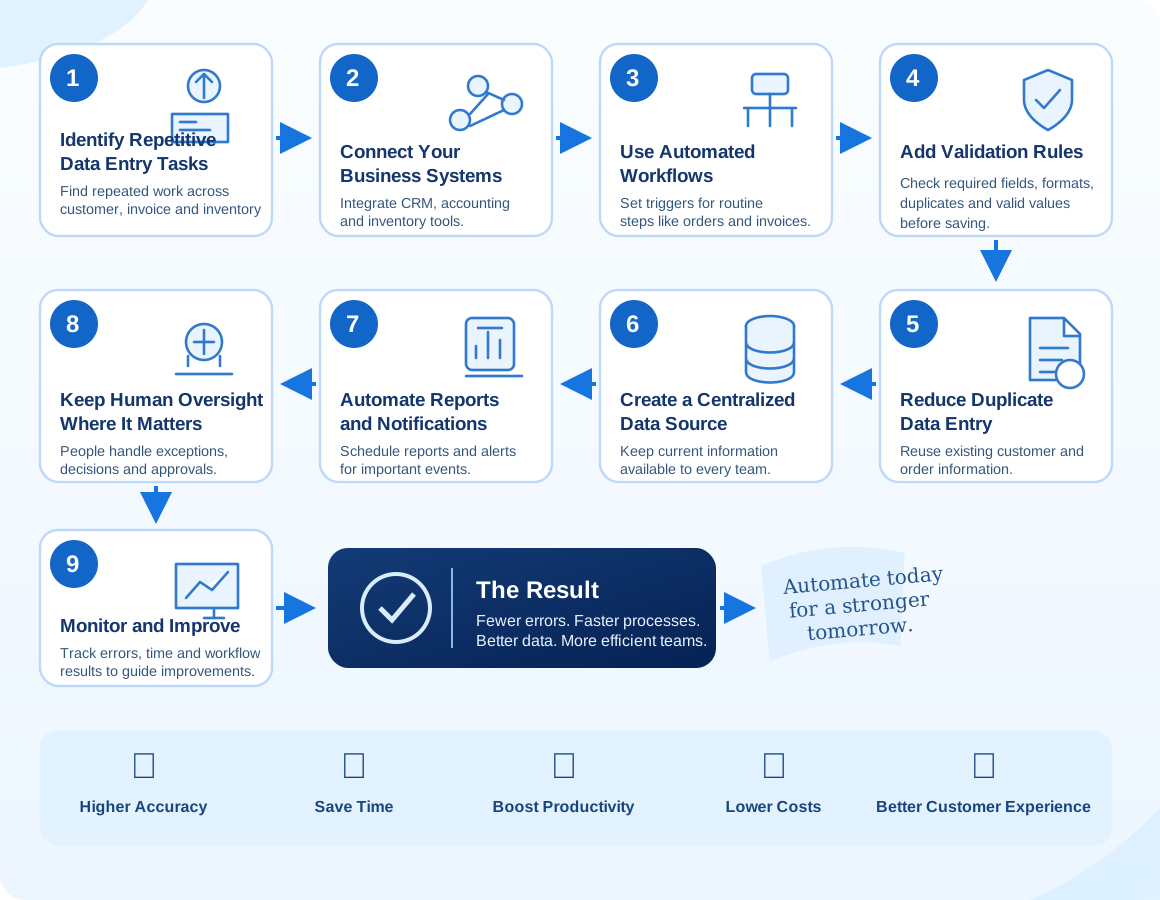
1. Identify Repetitive Data Entry Tasks
Start by identifying processes that require employees to repeatedly enter or transfer the same information. Look for customer details copied between systems, manual lead entry, inventory updates, spreadsheet-based invoicing, order transfers, recurring reports, employee record updates, and data moved between CRM and accounting tools. Prioritize tasks that are frequent, time-consuming, or prone to mistakes.
2. Connect Your Business Systems
Data entry problems often happen because business systems do not communicate. CRM, accounting, inventory, customer support, HR, sales, and e-commerce platforms may all hold separate records. System integration can move information between connected platforms automatically. For example, a completed order can send relevant details to the CRM and accounting system without employees entering them twice.
3. Use Automated Workflows
Workflow automation triggers predefined actions when specific conditions are met. A new order might create a customer record, update inventory, generate an invoice, and send a confirmation. Software can handle routine steps consistently while employees focus on exceptions and customer needs.
4. Add Validation Rules
Automation can prevent incorrect information from entering a system. Validation rules can require key fields, check email and phone formats, flag possible duplicate records, enforce acceptable number ranges, and ensure dates use the expected format.
5. Reduce Duplicate Data Entry
A connected system can reuse existing customer information and update only the fields that have changed. This saves time and reduces the chance of inconsistent records across teams.
6. Create a Centralized Data Source
Information scattered across spreadsheets, emails, and different platforms makes accuracy difficult to maintain. Depending on the organization, a CRM, ERP, custom business application, centralized database, or integrated dashboard can give employees a reliable source of current information.
7. Automate Reports and Notifications
Automated reporting can collect information from connected systems and present it in dashboards or scheduled reports. Businesses can also automate alerts for new leads, low inventory, pending payments, orders, customer follow-ups, expiring contracts, and support requests.
8. Keep Human Oversight Where It Matters
Automation does not need to remove people from every process. The goal is to automate repetitive tasks while employees handle judgment, approvals, communication, and decisions. A workflow can validate an order and check inventory automatically, then request manager approval before generating an invoice.
9. Monitor the Automation Process
After implementation, track data entry errors, processing time, duplicate records, employee hours saved, workflow completion rates, system failures, and customer response time. These measures show where automation works and where further improvements are needed.
When Should a Business Consider Automation?
Automation is particularly useful when employees spend significant time on repetitive administration, data is entered in multiple systems, errors affect customers or operations, processes depend heavily on spreadsheets, the company is growing quickly, or teams need timely information and reliable reports.
Custom Automation vs. Off-the-Shelf Software
Standard software can work well when a company’s processes match its existing features. Custom software may be a better fit when workflows are unique, integrations are specialized, or industry requirements are not supported by generic tools. Mithila Softech provides software development alongside web and mobile app development and software testing.
Conclusion
Manual data entry creates more than administrative inconvenience. Repeated errors, duplicate information, delayed updates, and disconnected systems can affect productivity, customer service, and business decisions. Identify repetitive processes, connect systems, add validation, automate workflows, and centralize important information. Targeted automation can solve specific bottlenecks while helping employees spend more time on higher-value work.
Frequently Asked Questions
How does business automation reduce data entry errors?
It reduces repetitive manual entry, applies validation rules, connects systems, and transfers information automatically between workflows.
What business processes can be automated?
Common examples include lead management, customer data entry, invoicing, inventory updates, order processing, reporting, notifications, approvals, and data synchronization.
Is business automation suitable for small businesses?
Yes. A small business can automate selected repetitive processes without implementing a large enterprise system. Starting with high-volume or error-prone tasks is often practical.
Does automation completely eliminate human involvement?
No. Effective automation handles repetitive tasks while people continue to manage judgment, approvals, communication, and decisions.
When should a business consider custom automation software?
Custom automation can help when standard software cannot support a company’s workflows, multiple systems need integration, or specialized operational requirements need a tailored solution.
← Back to Blogs